

In The Expanse: A Telltale Series, There’s a section at the climax of a scene in Episode 2 where Drummer uses a PDC turret to destroy incoming missiles in a quick time cinematic. The event is quite short, but as with any game, a lot of time and care went into each and every detail.
One such detail is that, even though most of the scene is in fact specifically animated, the turret itself – after it’s deployed- is not actually keyed. instead, we actually do have it track the motion of the missles in real time, and shoot bullets at them.
now for the most part, that’s not exactly ground breaking tech – aiming things is a pretty common part of game development. But the PDC turret introduced a very specific issue which will be the case study of this tutorial article

The pivot is not really anywhere near the center of mass of the gun itself. If it was, it would be as easy as just rotating the pivot to the target, but now we have to instead generate a rotation that specifically points the GUN at the target. how can we do that?
The first thing to keep in mind, is that the center of the gun itself is some distance away from the pivot. when the pivot rotates, this point traces out a circle, with the radius being the distance between the gun and the pivot. the second thing to keep in mind is that the barrel of the gun is tangent to that circle. With that information, we can figure out what angle we would actually need to rotate the pivot to aim correctly at the barrel at the target.
Let’s make a small diagram to build out a solution. we can begin with the pivot and the gun, depicted as a circle, and a target.

Here we can already see that if we just rotate the pivot to the target, the gun will overshoot.

however, we can see that there does exist a tangent line from the edge of the circle to the target- and since the gun barrel lies on a tangent, we can use that information to create the proper angle.

we can take the line to the target from the pivot, the tangent line, and the line from the center of the pivot to the tangent to create a right triangle. what we want to find then, is the angle from 0 rotation that gets the gun barrel on the tangent line.

So we’ll set up some angles:
a = the angle between the forward of the pivot and the direction toward the target
b = the angle between the direction toward the target and the radius line to the tangent
c = the angle between the direction toward the target and the up of the pivot
t = the angle between the line to that target and the tangent line
x = the angle we want to find

so we can first boil down what all we actually need to figure out numerically by doing some substitution and simplification. we know that
x = b - cfrom there, we also know that b, t, and a 90 degree angle make a right triangle. from this, we know that
180 = 90 + b + t
90 = b + t
b = 90 - t
next, we also know that c and a make up a right angle, and therefore:
90 = c + a
c = 90 - a
now, we can substitute
x = (90 - t) - (90 - a)
x = 90 - t - 90 + a
x = a - t
Now, that just seems like we moved some letters around. but, this is helpful – we can turn these into known quantities.
for a, this is just the angle between the pivot forward and the direction to the target, which we can find with the Arctangent of the Y and Z components of the vector to the target. for t, we can use our right triangle we created – the radius is our opposite side, and the distance to the target is our hypotenuse. we can use Asin(radius/distance) to find that angle

And there we go! this will be the basis for our replication in Unity (or any other game engine, of course). While we did this in 2D, the same process in 3D shouldn’t be too hard to process.
In The Expanse, and the version we’ll be replicating, there was a separate base for handling yaw- meaning we did everything in 2D for the pivot anyways.
also, a small peek behind the curtain – the aiming of the turret in the Expanse is actually… wrong. when I first math-ed all this out before, I goofed on calculating t, and used Atan(radius/distance) instead. it was only after release that I realized my mistake. luckily, the turret aims well enough to hide the imperfections- though, you can see the bullets whizz past the missiles if you look hard enough.
Step 0: setup
I’ll be making this in Unity. in Unreal I’d be doing some different things (since Unreal has actually GOOD transform utilities), so I’ll probably make an update to this later that includes an Unreal blueprints version.
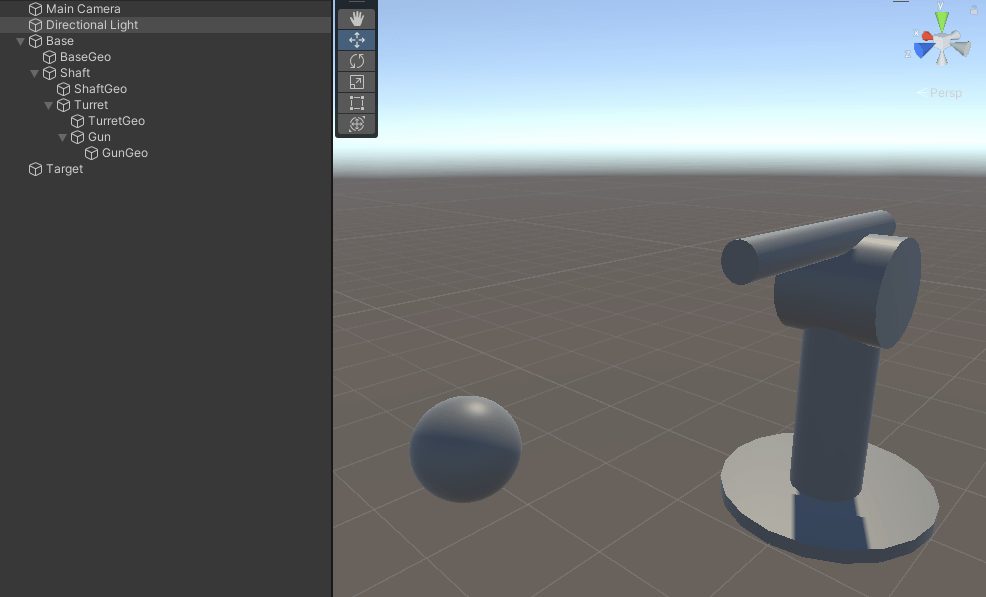
start a new scene and we’ll create some empty gameobjects in the following configuration:
- Base
- Shaft
- Turret
- Gun
- Turret
- Shaft
Where Shaft is at the center local to the Base, the Turret is some distance above the Shaft, and the Gun is some distance above that. adding some separate geometry representations (whose scale and position really don’t matter), we can create a simple turret. We’ll also add a sphere called Target, and we should end up with a scene like this:
On our base, we’ll add a new script component, called AimTurret

Open the script in your editor of choice. we’ll start by adding some variables:

We’ll also go ahead and assign those in the inspector with our empty game objects

We’ll update the rotations of the shaft first. To begin with, we’ll Null check our variables, then begin by getting the target position local to the base (which here with be the object the script is attached to). This will make the calculations easier, and additionally make it so we can point at targets no matter the orientation of the full turret
since we just want the yaw and nothing else, we’ll kill the vertical position and normalize the vector to get the 2D direction toward the target

to get the angle, we can just take the horizontal components of the position vector and use Atan2 to get the angle in radians. we can then create a local rotation quaternion with the angle, going around the up axis.
we’ll check to see if the rotation is valid (which just means making sure none of the components are NaN), and apply the local rotation to the shaft. We can use Quaternion.RotateTowards to add a little delay to the aiming.

Now we’ll calculate the turret pivot angle, in the same way we figured out above.
First, we’ll create a new transform. like before where we used the stationary base to calculate the angle for the rotating shaft, we want to use the consistent pitch of the shaft to calculate the pitch of the turret pivot. we’ll make the new transform centered at the turret pivot, with the same world transform as the shaft. we’ll then get the target’s position local to that transform.

we’ll get the Gun’s distance from the Turret pivot as the radius, and get the magnitude of the direction to the Target as our distance

we’ll normalize the local position of the target, then take the arctangent of vertical and forward components to get the a angle/initial pitch in our equation for the proper angle.
to get our corrected pitch, we’ll follow our equation from before, then create our local rotation with the pitch angle and the local right axis to rotate around (negating it so we get the proper angle direction)

Finally, check the if the rotation is valid, then set the local rotation of the Turret

And that’s it! you can hit play and move the Target around, and you should see that Turret aim the gun barrel correctly at the Target, like this

and this should hold up for any orientation of the full turret. you can even move the barrel around and see that it can still find the correct aiming for the barrel!
Hopefully this was helpful! See you in the next tutorial!